Pages

Receive More Updates

Date: - Time:
SMS: Send FOLLOW BALLOWAP To 40404 For Free - EMAIL: azeezbello8@gmail.com

Saturday, 6 September 2014

MIUI V5 Custom ROM for Karbonn A25 | No Bugs, Better RAM & Battery usage.


MIUI looks different than any Android ROM out there and to my eyes it is beautiful. It is fast, minimal and feature-rich, and is updated weekly with bug fixes and feature releases. You can enable most of these features on your Android device with the help of an app, but in MIUI they all work together, have a unified design language and all of them are in built so you don’t have to worry about a rogue app eating all your battery while you sleep.

ROM Features :

  • Greatly optimized the interface of Quick switch.
  • Adopted the latest official weather data to make the weather forecast more accurate.
  • Added filter in some themes to make the icons more suitable in the theme.
  • Added animation effect when using widgets to push away icons.
  • Powerful blocking feature.
  • 'Do Not Disturb' Option.
  • Music player that can automatically download album art and lyrics.
  • Thousands of downloadable themes.
  • Optimization :
    • Largely enhanced the loading speed of MiHome Launcher.
    • Screen can be locked much more quickly.
  • Fixed :
    • Sometimes the dynamic weather wallpaper cannot be disabled/enabled.
    • The last icon in a folder cannot be moved.

BUGS :

                 I have not found any bugs yet but it would be ethical and appreciated if you inform me about a bug if found which would be a rare case.

# Fixing Theme Manager FCs:
  1. After Booting Is Successful, Go To Setting.
  2. Under App Option, Search MiHome
  3. Select MiHome App & Wipe Data/ Cache Of App
  4. You Have Fixed FC Bug!

Disclaimer :

            I am not responsible for bricked devices, broken hearts, thermonuclear war, you getting fired because the alarm app failed.  I also don't promise you regular seks or increase of your salary after installing this rom. It's up to you, not to me. I can only guide/help you under such situations.

Screenshots :


ROM Download :

             I hope you have successfully installed MIUI on your KarbonnA25. Please share & like this post if you found it useful. I would love to hear your feedback for this rom in the comment section. 

Thursday, 4 September 2014

How To Host Blogger CSS and JavaScript Files in Google Drive

Anyone that has ever worked on a web design or development can tell you that where you decide to store your files is important. Every time someone visits your site, the server or host will access this location and bring up the relevant files that need to be displayed. Wherever you decide to store your files, this will have an impact on some important aspects like the speed that your site loads, your overall SEO ranking and your ability to make necessary adjustments to the site.

Things To Think About

When you are designing your online structure and where to store your important CSS and JavaScript files, here is a run down on how this decision might impact your site later on:

Site Loading Speed

By combining some of the style sheets and website files, the Blogger server only has to collect information from a single location. When you split up your files or decentralize the file system, it takes a longer time for all the data to come together to make your site possible.

Slow loading speeds can negatively impact your SEO ratings because the slower the site is, the less likely that visitors are going to wait around for it to load. If someone visits your site and immediately clicks the 'back' button because it's taking too long to load, that is going to increase your bounce rate and provide Google with statistics that show your site is either low quality or irrelevant to the search keywords.

File Storage Affects SEO

In addition to increasing your bounce rate, storing your files in a central location and managing the name of your files can affect SEO site wide. Web crawlers enlisted by Google, or some of the other search engines, index both the code on your site, and the name and directory of your files. If file names are random or not placed in the proper categories, the web crawlers aren't going to know what to do with the information.

Clear file structure and a central location provide you with incentive to organize everything and name them appropriately. All the content that is relevant to the subject of your website or blog will be in the same location for web crawlers to review.

Storage Locations Affect Editing Abilities

Shuffling through files and folders or opening up FTP connections just to make some simple edits can be a hassle, and take up a lot of time that could have otherwise have been spent writing new content.

If you're a Blogger site owner, this is something you need to think about. When you need to make alterations to things like social media sharing buttons, popular posts, recent posts and related posts widgets, you have to know where everything is intended to go, or risk losing both available content and money.

Some of the larger sites that produce hundreds of unique articles each month can't afford to have content in different locations. When articles start to get lost out of order, they run the risk of duplicating content on their site, or forgetting to post it altogether. Things should be right at your fingertips to minimize mistakes and reduce the amount of time spent editing the site while it's still live.

Storing Javascript/CSS Files With Google Drive

Storing Blogger CSS and JavaScript files with Google Drive will help to eliminate any of the problems mentioned above and reduce the clutter among your services. Taking this method can increase your site speed, increase the opportunities for a successful SEO campaign, and make your life so much easier.

Google Drive provides ample amount of space to store large files, and offers collaboration services so that you can work among different team members on the same project. Some of the files that you upload into the cloud services can remain unpublished and stay within the private site, whereas other files like blog posts can be published or stored to the public site.

Another beneficial feature of storing all your Blogger files on Google Drive is that it is highly secure. Google comes with the backing of one of the leading companies in the technical world so that you can be sure your content is safe from hackers and those looking to compromise your site.

This guide will provide you with step-by-step instructions on how to setup your Blogger site using Google Drive. It's completely free to take advantage of this strategy, and will provide you with a solid platform from which to build your blog.
host blogger css javascript files

Step 1. Prepare the CSS/JavaScript Files

  • First, we need to create the file that we need to host. To host a CSS file, open the Notepad and paste the CSS code (if it is enclosed within the <style> and </style> tags, remove them). 

  • In the Notepad menu, select 'File' > 'Save as' and type the file name with the .css extension just like I did with mycssfile.css - see the screenshot below.
create a css file
  • In the same window, choose "All files" in the "Save as type" option and set the Character Encoding to UTF-8. 

  • If you want to host a JavaScript file, add the .js extension (instead of .css) at the end of your file name (remove the <script>...</script> tags if you see them). Click "Save" and navigate to the location where you want to save the file. 

Step 2. Upload Your File on Google Drive

  • Access https://drive.google.com and log in with your Gmail account. After you logged in, click on the 'Create' button and add a new separate folder to upload your JavaScript and CSS files.

create folder in Google drive
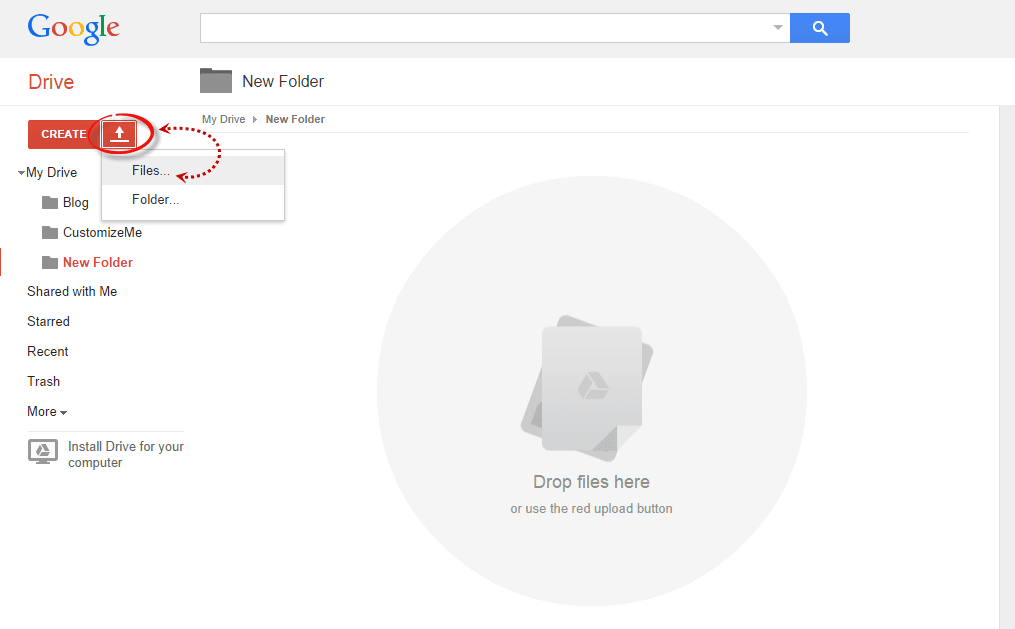
  • Open the newly created folder, and click on the Upload button with the upward arrow to choose the files that you need to upload.

upload files using google drive
  • Now, navigate to the location where you saved the files, select them (to select multiple files, press and hold down the Ctrl key on your keyboard and then click on them) and press the Open button.
  • After the files have been successfully uploaded, right click on the file names (to select all your files in the folder, click on the checkbox) and select 'Share':

share google drive files
  • In the 'Sharing settings' window, click on the 'Change' link and choose the 'Public on the web' option. Press 'Save' and copy the link(s) of your uploaded file(s) from the 'Links to share' box highlighted in blue, then paste it into a Notepad to use it later.

javascript css file sharing

Step 3. How to Add an External CSS/JavaScript file to Blogger

Before you can use the links, you must replace 'https://drive.google.com/file/d' to 'https://googledrive.com/host' and remove '/edit?usp=sharing' in the link.

For example, the link to mycssfile.css that I copied looks like this:
https://drive.google.com/file/d/0B4n9GL3eVuV-TkphMkc3SFR2Slk/edit?usp=sharing
Notice the part in blue after the "/file/d/" part. That is the file ID which is used to access it via the new hosting service. It should start with the following URL:
https://googledrive.com/host/
Add the file ID like this (remove the '/edit?usp=sharing' part):
https://googledrive.com/host/0B4n9GL3eVuV-TkphMkc3SFR2Slk
Now log into your Blogger account, select your blog and go to Template > Edit HTML. Click anywhere inside the code area and press the CTRL + F keys to open the search box:

open blogger search box

If you want to add a CSS file, type the following tag inside the search box and hit Enter to find it:
<head>
Just BELOW the <head> tag, add this line:
<link rel="stylesheet" type="text/css" href="https://googledrive.com/host/0B4n9GL3eVuV-TkphMkc3SFR2Slk" />
And replace https://googledrive.com/host/0B4n9GL3eVuV-TkphMkc3SFR2Slk with the link of your CSS file:

add external css to blogger

If you want to add a Javascript file, search for the following tag:
</body>
And add this line just ABOVE it:
<script src='https://googledrive.com/host/0B4n9GL3eVuV-eVYwLXBrTlZrVDg' type='text/javascript'></script>
Replace the line in blue with your URL:

add external javascript js to blogger

Finally, press the 'Save template' button to save the changes. And you're done!

In Conclusion

Once you have successfully saved all your file folders and closed out of the drive. Open your site in a browser and make sure that all the changes have completed successfully.

Next time you want to edit any of the information or move internal files, all you have to do is open up the Google Drive folder on your account and make the modifications from that location. Those files will then automatically sync to the online folder and make updates to your site. This works the same if you want to change the appearance by modifying the CSS code to extend the header, footer, or make customizations.

As you can see, changing your file storage out so that is CSS and JavaScript is stored on your Google Drive account is easy to do and only takes a few minutes. After you make the change, you can begin benefiting from faster loading speeds, higher SEO rankings, and overall a more convenient platform to work from to increase the efficiency of your work.

Wednesday, 3 September 2014

Convert XLS : Free Software That Converts XLSB File To XLS

Yesterday, while trying to access the phone numbers of people in Lagos, Nigeria in my GSM database, the Microsoft Excel program on my laptop couldn't open it. Whenever I double-click on it, it keeps telling me that Excel cannot open the file because the file format or extension is not valid.


After looking closely at the file, I discovered that the file ends with .xlsb extension (Excel Binary Workbook file) which is not compatible with the version of Excel on my laptop. I tried using zamzar.com to convert it to xls but the online file converter couldn't process the request.


I decided to google how to convert .xlsb to .xls and I was lucky to stumble on a review of the free "Convert XLS" software; Microsoft Binary Workbook Conversion and Manipulation tool. I downloaded it to my laptop, installed it and successfully used it to convert the file to xls format which opens fine in Microsoft Excel.


interface of convert xls software
Convert XLS software


How To Convert an XLSB File to XLS


==> Download Convert XLS Software

==> Launch it and Select "Convert Files"

==> Select "Ms Excel" conversion method. (Requires that you have MS Excel 2007 or greater installed)

==> Select the input file (the .xlsb file)

==> In the "Convert To File Format" dropdown, select .xls

==> Enter the path for the converted file in the "output file" field

==> Click the "Convert" button at the top of the interface.


Monitor the conversion process on the progress bar at the bottom of the interface. Once completed, open the xls file and you should be able to acccess the content with the Ms Excelfile on your PC.


That's all.


Tuesday, 2 September 2014

The Truth About GNLD Marketing Vacancies on Job Sites In Nigeria


I saw this on Nairaland and decided to share it with you. Read carefully and share with friends.


Wellness homes claims to be a health maintenance organisation but they  are just a distributor of a foreign company known as GNLD.  Wellness homes has many subsidiaries such as bloomnet, healthstream alliance and keylinks golgen concept, Accent Hills (Now in Akure) Etc.


Mind you, they are not fraudsters. But just that they are not open. They won't tell you the truth until you are in. Wellness homes which is located on 9 oremeji street, isolo Lagos claims to be a health maintenance organisation and they advertise fake jobs on Nigerian job portals.


They claim to be in search graduates to work as business development executives, client relations officers, admin officers etc.  They advertise these fake jobs on jobsites and after you have applied, they send you text message inviting you for an interview at no 9 oremeji street, isolo, lagos or at any of their branches.  Notice that the text message arrives late on the day before the interview.  This is done in order for you not to be able to verify the address.  Just type 9 oremeji street in google and you will find many stories about it.


On arrival at the interview, graduates that have traveled from distant parts of Nigeria in the hope that a genuine company wants to interview them for a job discover that is not the case.  Wellness homes and its subsidiaries are just distributors of supplements.


In Nigeria today, the demand for supplements is low and the people at wellness homes know this but they have to sell their products.  And what better way to sell their products than to lure unsuspecting jobseekers into purchasing their products.  That is the truth about wellness homes, they are wholesalers and they want you to buy their products.  They are the sellers and you are the buyer.


In my professional opinion I won’t advice you to purchase the supplements because there is no demand for it.  The people at wellness homes know this, if the demand is there why cant they sell it themselves and keep the profits for themselves.


Wellness homes charge jobseekers =N= 8500 for training to become a nutritionist, but again the market is not there for nutritionists.  In my professional opinion I won’t advice you to pay the training fee of =N=8500.  It is after you have paid the training fee of =N=8500 that they inform you that they are distributors and that you have to buy their supplements.  The minimum you can buy is around =N=30,000 worth of supplements.  If you sell this =N=30,000 worth of supplements you will make around =N=48,000 as revenue giving you a profit of =N=18,000.  But the demand is not there and you may end up not selling the supplements for months or years.


The issue with wellness homes is that they are not operating illegally, all they do is to deceive jobseekers into paying =N=8500 for training and into buying their products.  Because they are not operating illegally, you can’t file a lawsuit against them or call the police.  But what you can do is to demand a refund of your =N=8500 training fee because they did not inform you that you have to buy their supplements.


If they refuse to refund your training fee, then you can sue them or call the police.  =N=8500 may seem like small money but if 1000 jobseekers don’t ask for a refund the amount they make from unsuspecting jobseekers is =N=8,500,000.  Also, if 1000 jobseekers purchase =N=30,000 worth of supplements, the amount they make from unsuspecting jobseekers is =N=30,000,000 worth of supplements.


The more products unsuspecting jobseekers buy from them, the more profits they make as wholesalers plus the foreign company known as GNLD pays them more commission and gives them travel benefits.  Please be informed that this travel benefit is only for the few top bosses of wellness homes.  But they trick you into believing that you can also become one of the top bosses by selling more supplements.


The fact is that you will never sell enough supplements because the market is not there.  But wellness homes have their market, you are their market.  They are more or less dumping the supplements on you.  My advice to you is to ask for a refund of your training fee and get out.


Wellness homes also claim to test people with a machine known as the quantum resonance body analyzer.  They claim that this device can test 30 internal organs of the body, but is that so? In my professional opinion, in order to test internal organs of the body, you need to take not only one blood test but a series of blood and sample tests so how can a mechanical device test the functioning of your internal organs without blood or sample tests.


Also, there is not enough information on the Chinese made quantum machine by western scientists.  If the machine is truly genuine then more information will be available to everyone.  In my professional opinion it is not possible to test the functioning of internal organs without blood or sample tests.=


Wellness homes lure unsuspecting jobseekers into paying the training fee and in to buying their products by informing the jobseekers that wellness homes will provide them with the quantum machine in order to carry out tests on Nigerians at a price of around =N= 4000 per test.  They in form the jobseekers that the jobseekers can test over 100 people per day resulting in a revenue of =N= 400,000 per day.


They claim to pay jobseekers all of the revenue made form the quantum tests.  But why are they so generous? If the test is truly genuine why can’t they carry out the test themselves and keep the profits for themselves.  They do this to lure jobseekers into paying the =N=8500 training fee.  I don’t know whether or not they carry out the quantum test on Nigerians or not but in my professional opinion it is not possible for mechanical device to test the functioning of internal body organs.  You might as well test your internal organs with a boiling ring or a gas cooker as far as I am concerned.


The main trick jobseekers fall for is the lie that you can make =N=4000 per test.  I am sure that Nigerians are not silly and they will rather go to a public hospital for a blood and sample test than to spend =N=4000 on a phantom machine.  You may have read blogs about people claiming to make lots of money from quantum tests but it is probably the people at wellness homes that that put the message on the blog in order to deceive jobseekers.


My advice to jobseekers is to demand a refund a refund of their training fee.  But again if you believe that you can sell their products, it is up to you.  But the truth is that the market is not there but wellness homes have their market, you are their market.  Wellness homes don’t offer jobs, they are just wholesalers of products that nobody wants to buy.  My advice to jobseekers is to google the addresses of the interview before you go for the interview.  For your information 9 oremeji street, isolo is a bungalow located in a residential neighborhood and there is no signboard on the building.

CcHUB Nigeria (Co-creation Hub) Announces $500,000 Seed Investment Program

Co-creation Hub Nigeria; a social innovation centre dedicated to accelerating the application of social capital and technology for economic prosperity, boosts its incubation program with the launch of a $500,000 seed investment fund to support early stage start-ups over the next two years. Start-ups will receive sums ranging from $10,000 - $25,000 to support business model experimentation  and operations.


cchun nigeria logo


Initial beneficiaries of the seed program are :


  • Vacantboards (www.vacantboards.com) :  led by Tunji Also is an online outdoor advertising marketplace which enables one-click booking of outdoor advert spaces & tracking of advert campaigns. 

  • Truppr (www.truppr.com) founded by Bosun Tijani is a social tool that connects people with physical activities and teammates in cities across the world. 

  • Traclist (www.traclist.com) run by Emotu Balogun is an online marketplace that helps fashion retailers expose their inventory and allows customers all over Nigeria to buy from wide array of  products. 

  • 500 shops (www.500shops.com) led by Clive Ayonye offers small and medium sized businesses the opportunity to set up a complete online store and accept orders in minutes.

  • Genii games (www.geniigames.com) led by Adebayo Adegbembo delivers educative apps aimed at preserving and promoting African Culture and related subjects which include languages, etiquette and ethics.


The initial beneficiaries of the seed investment went through CcHUB’s Pre-Incubation program which identifies and supports aspiring technology entrepreneurs looking to address local market problems with relevant solutions.


Through the $90,000 Tony Elumelu Foundation/CcHUB pre-seed fund, beneficiaries started out with a grant award of $5,000 each to support their ideas, build working prototypes, carry out initial market testing & proof their concepts. These ideas grew steadily, earning revenues, increasing their user bases and building partnerships hence needing a different kind of support.


Startups looking to transform the way Nigerians live, play and do business can also apply to join the portfolio via http://cchubnigeria.com/pre-incubation/


Monday, 1 September 2014

The Relationship Between Stress And Your Heart's Health

[caption id="attachment_710" align="aligncenter" width="211"]stress stress[/caption]

What is stress?


Stress is a normal physical response to events that make you feel threatened or upset your balance in some way. When you sense danger —whether it’s an illusion or reality or when your work becomes so demanding, your body's kick into high gear, trying to make you adjust yourself and respond to the change properly to produce the very best result.

Everyday we go about our daily activities , every morning will always have some of us running to work. as students we run to school, and even the individuals that are to remain at home are not even free from stress. At some point we will be faced with certain tasks so different and demanding from the ones we see in the previous days, in some cases you will be forced to think and make a very important decision, sometimes it comes as increased loads of work. It comes in so many forms. It follows us about, it is part of us; part of our daily life, the only thing that matters at the end is if you where able to solve problem that aggravated the stress.

Inasmuch as stress helps you surmount your daily problems, it is never a good friend to any part of the body. Stress affects so many things in our body. In adults, studies has it that it causes hair lost and possibly baldness in men (telogen effluvium). chronic stress can also aggravate existing skin problems including psoriasis, rosacea, acne and eczema.   Chronic stress can trigger a variety of mental and emotional problems including insomnia, headaches, irritability, depression, anxiety and personality changes.  Stress also causes excessive weight gain. Finally, Stress can also have an impact on reproductive health, ranging from sexual dysfunction,  infertility. It can also cause changes in sex drive, vaginal infections and impotence.

In all the effects of stress thus stated above, i want to focus the purpose and usefulness of this article to the relationship between stress and cardiovascular health (referring to the heart and blood vessels). As stated above, stress is not a good friend to the body and the heart is not an exception. According to anatomy that defined the heart as a modified blood vessel, being a hollow organ that pumps blood to the other parts of the body. Unarguably, the heart is one of the so many important organs that man cannot do without. Prolonged stress increases the secretion of the fright and flight hormone (adrenaline) which affects the  blood pressure, blood sugar and other things in ways that gives the heart concern. adrenaline increases your blood pressure as well as your heart rate, and which may further lead to narrowing of the coronary arteries (arteries that supply blood to your heart), or even bind directly to heart cells allowing large amounts of calcium to enter and render the cells temporarily unable to function properly.

When their is an increased blood sugar, insulin resistance (Insulin resistance (IR) is a physiological condition in which cells fail to respond to the normal actions of the hormone insulin. The body produces insulin, but the cells in the body become resistant to insulin and are unable to use it as effectively, leading to hyperglycemia). When insulin resistance sets, it can lead to type 2 diabetes and hardening of the arteries.]


How To Upload and Use Custom Fonts in Blogger

Just about anyone can write and publish his or her own blog. In fact, there are about 152 million blogs out there on the internet. But, if you want your blog to stand out you need to impress visitors with the little things. You need to be able to catch there attention and keep it so that they want to come back.

Complementing your blog post with images, links, and catchy titled is a great way to start and should be something you practice on just about everything you post; however, don't just stop there. If you really want to impress people and draw attention toward your blog, you want to start where the content all begins. You need to make use of custom fonts in Blogger. This guide will help you learn a little bit about font styles and how to upload new fonts onto your Blogger site.

The Different Types of Font

Before you can upload any font files, you need to find the right font and typeface that will fit your style. Typeface is the design and symbols used for the letters; font is the actual characters. Some of the most common typeface terms that you should probably be familiar with before starting are:

  • Serif - distinguished by small decorative lines that are attached to the end of letter strokes; best used for the paragraph or body content.
  • Sans-serif - modern looking letter strokes that lack the decorate lines at the end; instead the letter end abruptly.
  • Script - a handwriting typeface that looks like cursive letters or custom strokes.
  • Display - typeface that is designed to stand out from the rest of the page; characterized by a broad and unique use of informal letter designs and transparency. Display typeface is best used on titles and headers.

Within each web browser there are also certain types of font files that are used. Most of the browsers, except Internet Explorer and the iOS browser, will use TTF font file. Internet Explorer is the only web browser service that uses EOS files, and Apple has opted for using an SVG for their mobile and tablet based products. Some custom fonts in Blogger have to be in an @Font-Face kit, but this will be discussed later on.

Where to Find Font

You can find custom font all over the internet when you're ready to get started. Some custom fonts in Blogger are free to use and can be downloaded to your computer, others you are considered 'premium' and you have to pay to use them, so please check twice whether they are having Commercial or Personal licenses. Google offers its own font service known as Google Web Fonts which can be a good place to start looking around for custom fonts in Blogger.

Using the Google Web Fonts service, you run a filter to find select fonts based on width, thickness, and slant. Better yet, you can test out how using the custom fonts in Blogger would appear by modifying the size, and viewing it in a small display window. If you like a couple different fonts, you can save them to your collection to come back to later.

Adding a Custom Font to Blogger from Google Web Font

Step 1. To browse the Google Fonts library, access www.google.com/webfonts. There are 650 font families in the collection right now, and they keep adding more, so you may want to sort them.

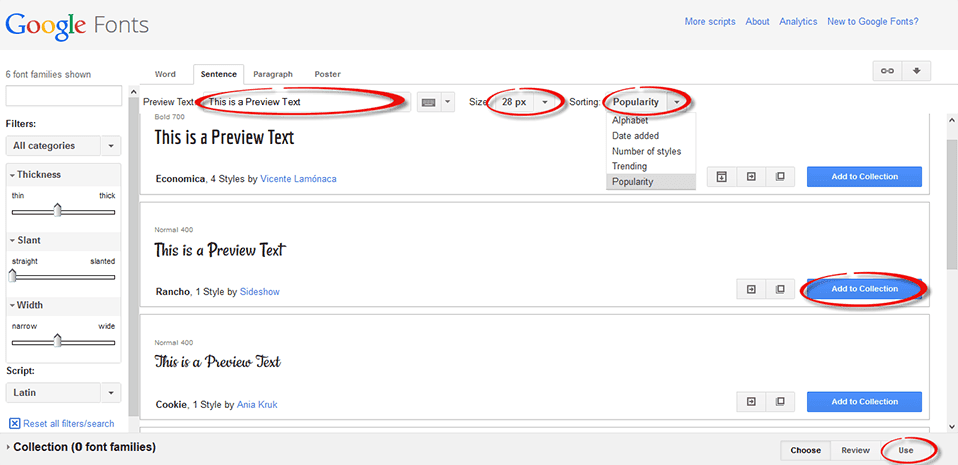
To organize the fonts by style, you can use the menu on the left side. The top menu lets you to add and preview your own text using the 'Preview Text' field. From the same menu, you can pick the 'Size' and sort the fonts in 'Alphabetical order', by 'Date added', 'Number of styles' and 'Popularity':

google web fonts

Step 2. Once you decided what font you want to use, click on the 'Add to Collection' button and then hit the 'Use' tab. This will take you to the 'Almost done!' page that will give you a link to the style sheet found in the 'Standard' tab (point 3) and the CSS style (point 4).

The link to style sheet would look like this:
<link href='http://fonts.googleapis.com/css?family=FONTNAME' rel='stylesheet' type='text/css'>
And the CSS style would look like this:
font-family: 'FONTNAME', cursive;

google fonts CSS

Step 3. Now that you have selected the fonts and have a general understanding of the different types of fonts available, you can head over to your Blogger blog. Open up the Dashboard and make sure that the first thing you do is to create a backup of your template: go to Template and press the "Backup/Restore" button on the upper right side. That way, you can revert the changes back to the original in case something goes wrong. 

Step 4. From the same "Template" location, press the "Edit HTML" button:


Step 5. Click anywhere inside the code area and press CTRL + F at the same time (PC) or Command + F (Mac) to open the Blogger' search box and type <b:skin> inside the search box. Press Enter and it will take you to the <b:skin> tag, which will be highlighted in yellow:

adding custom font to blogger
Step 6. Directly above the <b:skin> tag, copy & paste the link to the style sheet provided by Google Web Fonts (step 2). To prevent any errors, add a forward slash (/) right before the closing angle bracket (>), like this:
<link href='http://fonts.googleapis.com/css?family=FONTNAME' rel='stylesheet' type='text/css' />
Step 7. To apply the font on a specific part of our blog, we'll need to find the CSS selector and add the CSS style (point 4) just AFTER the curly bracket. If you don't know how to find the id/class selector, please read this tutorial: Add CSS rules to Design a Blogger blog using Firebug

For example, if I would want to add the "Rancho" font to the posts and comments titles, I will paste the CSS style like this:
h3.post-title, .comments h4 {
  font-family: 'Rancho', cursive;
  font-size: 28px;
}
Where "h3.post-title, .comments h4 {" is the class selector for the post and comments titles. Note: to change the size of your font, add the "font-size: 28px;" part as well, and change the "28px" value to make the font bigger/smaller.

custom font to blogger titles

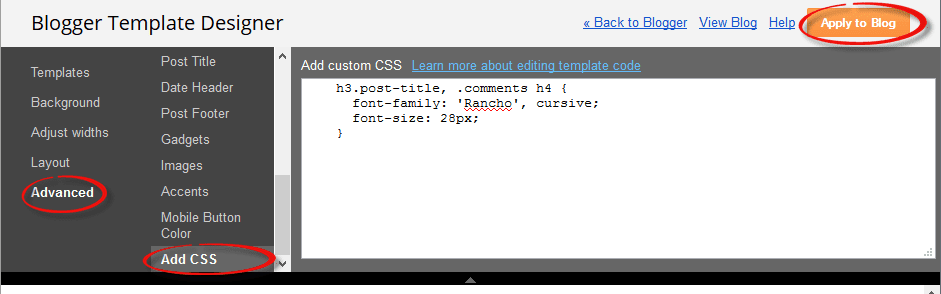
You can also add the same CSS to "Template" > press the "Customize" button the right side, navigate to "Advanced" > "Add CSS" tab and paste the CSS code in the empty box.

css, blogger template designer

Step 8. Finally, press the "Save Template" button and you're all set!

Using a Custom Font that isn't on Google Web Fonts

Some of the good places to find free fonts are DaFont, FontSquirrel and UrbanFonts. Click to download the kit (unzip it if necessary), and save the TFF or OFT file on your desktop.

fontsquirell download font

Step 1: Convert the Font File

The font file that you've downloaded is most likely in a TFF or OFT file since this is the most popular type. You need to convert this file into a @Font-Face kit. Many online services can help you do this, but here are two recommended sites:


If you are using the Font Squirrel Webfont Generator: press the "Add Fonts" button, choose the font file that you saved on your desktop and check the "Yes, the fonts I'm uploading are legally eligible for web embedding." checkbox. After the font has been successfully uploaded, click the "Download your kit" button.

font squirrel webfont generator

This should open the kit containing 4 formats of fonts (inside the fonts folder), a CSS stylesheet & the html file for the demo page. The only files that you need to extract are the ones with the .woff, .tff, .svg, .eot extension and the stylesheet.css file.

webfontkit rar file

Step 2: Upload The Font Files To Blogger

Custom fonts in Blogger have to be uploaded before you can use them. For this, we are going to use Dropbox and upload them to Public folder (upload only the files with the .woff, .tff, .svg and .eot extension).

upload fonts using dropbox

Once you've uploaded them, copy the Public URL's of all 4 fonts: right click on each file, choose "Copy public link..." and press the "Copy to clipboard" button. Paste each link separately in a Notepad, so that you can link to that location later.

copy public link in dropbox

Next, open up the stylesheet.css file that came with the kit and it will show you a similar code:
/* Generated by Font Squirrel (http://www.fontsquirrel.com) on September 2, 2014 */

@font-face {
    font-family: 'fontname';
    src: url('font-name.eot');
    src: url('font-name.eot?#iefix') format('embedded-opentype'),
         url('font-name.woff') format('woff'),
         url('font-name.ttf') format('truetype'),
         url('font-name.svg#fontname') format('svg');
    font-weight: normal;
    font-style: normal;
}
Edit the link location to point toward the font file that you just uploaded to the Dropbox Public folder and pay attention to each extension which should correspond with that found in the stylesheet.css file.

For example, if you uploaded the font .tff file with this name:
https://dl.dropboxusercontent.com/u/62316253/amatic-bold-webfont.ttf
...change the CSS link in blue in this line:
url('font-name.ttf') format('truetype'),  
to point to:
url('https://dl.dropboxusercontent.com/u/62316253/amatic-bold-webfont.ttf') format('truetype'),
After you've added all the links, copy the stylesheet.css code that you modified to your clipboard.

Step 3: Editing Blogger's CSS

Open up the CSS on your Blogger site. This can be found by navigating to Template > Edit HTML. Next, click inside the code area and press the CTRL + F keys to open the search box, then type the tag below and hit Enter to find it:
]]></b:skin>
Just ABOVE this tag, add the code that you copied in the stylesheet.css file.

custom face fonts in blogger

Finally, we need to declare the custom font using CSS. For example, if I want to change the font of the post title, I will add the line in red from above, just below the "h3.post-title, .comments h4 {" CSS selector:
h3.post-title, .comments h4 {
font-family: 'fontname';
font-size: 28;
}
Obviously, the fontname will be the actual name of the font. This will make sure that your blog can use the custom fonts in Blogger. After we've made these changes, press the "Save Template" button and exit.

Step 4: Test Out the Site

Navigate back to your sites homepage and you should now see the custom fonts in Blogger that you uploaded during the last few steps. Every time you go to make a new post, the site will now be able to use your font.

In Conclusion:

Website design is an important part to maintain a successful blog. As a blog owner, you are responsible for providing content that isn't just fun to read, but looks good. Modifying the font is just one easy way that you can help your blog stand out without making any major changes to your blog itself.

Do you have any other methods for adding custom fonts? Let us know by leaving a comment below!

PLACE YOUR ADS HERE