
If you've enabled custom Blogger mobile template, you can customize the mobile view of your blog as you desire. You can add and remove whatever you like in as much as you know how to go about it. Today, I have decided to share with you, how to add Facebook mobile comment form to Blogger or Blogspot mobile view.

To get started, I recommend you enable Custom Blogger mobile template. If you don't know how to do that, sign in to your blog, go to "Template". Click the icon under "Mobile". Select "Yes. Show mobile template on mobile devices". Select "Custom" from the drop down box and SAVE.
Next is to get your blog's Facebook APP ID handy. If you know the ID, copy it somewhere and if you've forgotten it, you can check the Facebook apps page. If you can't find it on the apps page, then you need to read how to get Facebook application ID for your blog here.
Next is to log in to your Blogger dashboard, back up your template and go to "Template" > "Edit HTML"
==> Click inside the HTML and use CTRL F to find : <body
==> Directly below it, paste <div id='fb-root'/>
==> Open a new tab on your browser and go to www.freehtmlparser.blogspot.com
==> Copy and paste the code below inside the box on the page
==> Carefully replace the highlighted appID with the Facebook app ID of your blog
==> Click "Encode"
==> Go back to the browser tab where you have your blog HTML
==> Copy and Paste the encoded script directly below the <div id='fb-root'/>
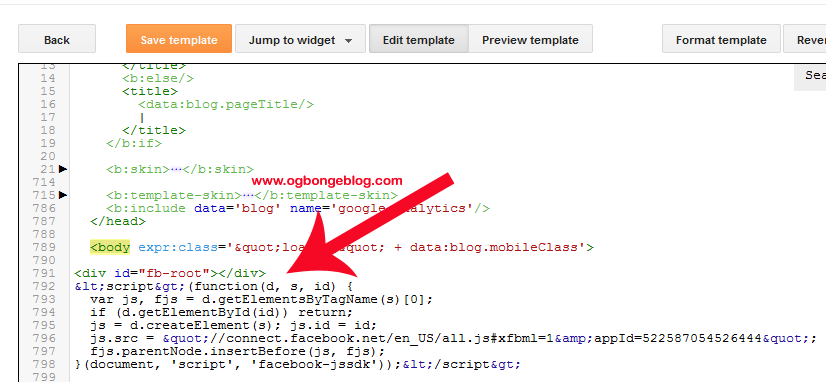
==> Now, your HTML should look similar to the screenshot below:
==> Click "Save Template"
==> Click inside the HTML and use CTRL F to find :
==> Carefully find the ending </div> as seen in the screenshot below:

==> Directly below it, copy and paste the code below:
--> Click SAVE Template.
View one of your blog posts and the comment box should appear on the mobile view, above the Blogger comment form.
Try this and let me know if it works for you. Also leave your comments if you've questions to ask.
Note: You might not find in your template if you are using a third-party template.
To get started, I recommend you enable Custom Blogger mobile template. If you don't know how to do that, sign in to your blog, go to "Template". Click the icon under "Mobile". Select "Yes. Show mobile template on mobile devices". Select "Custom" from the drop down box and SAVE.
Next is to get your blog's Facebook APP ID handy. If you know the ID, copy it somewhere and if you've forgotten it, you can check the Facebook apps page. If you can't find it on the apps page, then you need to read how to get Facebook application ID for your blog here.
Next is to log in to your Blogger dashboard, back up your template and go to "Template" > "Edit HTML"
==> Click inside the HTML and use CTRL F to find : <body
==> Directly below it, paste <div id='fb-root'/>
==> Open a new tab on your browser and go to www.freehtmlparser.blogspot.com
==> Copy and paste the code below inside the box on the page
<script>(function(d, s, id) {
var js, fjs = d.getElementsByTagName(s)[0];
if (d.getElementById(id)) return;
js = d.createElement(s); js.id = id;
js.src = "//connect.facebook.net/en_US/sdk.js#xfbml=1&appId=1569785879914041&version=v2.0";
fjs.parentNode.insertBefore(js, fjs);
}(document, 'script', 'facebook-jssdk'));</script>
==> Carefully replace the highlighted appID with the Facebook app ID of your blog
==> Click "Encode"
==> Go back to the browser tab where you have your blog HTML
==> Copy and Paste the encoded script directly below the <div id='fb-root'/>
==> Now, your HTML should look similar to the screenshot below:
==> Click "Save Template"
==> Click inside the HTML and use CTRL F to find :
<b:if cond='data:top.showMobileShare'>
==> Carefully find the ending </div> as seen in the screenshot below:
==> Directly below it, copy and paste the code below:
<p align='center'>
<span style='font-size: 15px;font-weight:bold;'>Facebook Comment Box </span>
</p>
<div style='text-align: center;'>
<fb:comments expr:href='data:post.url' expr:title='data:post.title' expr:xid='data:post.id' mobile='yes' numposts='10'/>
</div>
--> Click SAVE Template.
View one of your blog posts and the comment box should appear on the mobile view, above the Blogger comment form.
Try this and let me know if it works for you. Also leave your comments if you've questions to ask.
Note: You might not find in your template if you are using a third-party template.
