Pages

Receive More Updates

Date: - Time:
SMS: Send FOLLOW BALLOWAP To 40404 For Free - EMAIL: azeezbello8@gmail.com

Thursday, 10 July 2014

Seminar: How To Import Products from USA and other Countries without getting RIPPED off by Sellers

Are you ready to make more than #100,000 Monthly From Importation Business working from home in Nigeria?


ARE YOU READY TO LEARN HOW TO START YOUR OWN IMPORTATION BUSINESS and avoid the 5 Most Common and Costly Mistakes IMPORTERS make?


If your Answer is YES, then you MUST attend this step-by-step training session that is going to take place on the 12th July, 2014 in Lagos, Nigeria.


The seminar will be anchored by Yusuf Onabekun and Fabinu Ibidapo; two great guys that have been importing consistently and training individuals on various means of making money online.


They will take you by the hands and guide you on  how to import from USA and other countries to Nigeria unlike some so called "importation gurus" who only know about importing from China. They will take you through the whole process of Importation Step by Step, and how to get Cheap Quality Products, Identify Great Suppliers and Receive your Shipments in Nigeria without Problems!.


The seminar is a No-Nonsense Training Class where Fabinu and Yusuf intend to take only the most interested and success driven individuals through the challenging waters of Online Importation Business and make them Professional Importers within a very short time!


On attending this Seminar, you will have the best time of your life, as you're being shown the newest and Most Effective Methods of getting the Best Product Prices, How to convince sellers to get great Discounts and how to simply make cool cash from your Importation Business!


You will start your importation business as soon as you leave the Seminar venue.


If after attending this ground breaking training session, you still have challenges buying stuff online, tracking your items or doing other necessary things, they promise to help you every step of the way for two full months!


But they are so positive of the Value of Our Seminar that I don't even think you'll need their assistance afterwards!


Here's What You'll Discover At The Seminar


  •  How to import ANYTHING from U.S and other countries

  •  The RIGHT WAY to use online sourcing- without getting screwed around

  •  The ONE WORD that will always get you tons of FREE Samples from China Factories

  • How to get your first Order built BELOW Factory Cost

  • Legal loopholes to get up to 50% off all Custom Duties and Tariffs

  • And Much More!


How Much To Attend The Seminar?


The Seminar Fee is Just 6,500 Naira!  Instead Of 10,000 Naira! 


How To Pay


Full info at: {link removed because the seminar is over}


Cheers!

Wednesday, 9 July 2014

Add Custom Robots.txt File in Blogger

Are you one of modern day bloggers without much knowledge of technical details, looking to enhance your blog's ratings and audience but don't know how to and your blogger friend told you that you can get a hike into your site visitors via editing your Robots.txt file? Or maybe you don't want search engines spiders to crawl through your pages? Or you do have a technical background but don't want to risk making changes without expert's words on topic? Well in either case, this is the right place for you to be. In this tutorial, you will see how to add Custom Robots.txt file in Blogger in a few easy steps.
custom robots.txt

But before we open and start working on Robots.txt, let's have a brief overview of its significance:
Warning! Use with caution. Incorrect use of these features can result in your blog being ignored by search engines.

What is Robots.txt?

With every blog that you create/post on your site, a related Robots.txt file is auto-generated by Blogger. The purpose of this file is to inform incoming robots (spiders, crawlers etc. sent by search engines like Google, Yahoo) about your blog, its structure and to tell whether or not to crawl pages on your blog. You as a blogger would like certain pages of your site to be indexed and crawled by search engines, while others you might prefer not to be indexed, like a label page, demo page or any other irrelevant page.

How do they see Robots.txt?

Well, Robots.txt is the first thing these spiders view as soon as they reach your site. Your Robots.txt is like a hour flight attendant, that directs you to your seat and keep checking that you don't enter private areas. Therefore, all the incoming spiders would only index files that Robots.txt would tell to, keeping others saved from indexing.

Where is Robots.txt located?

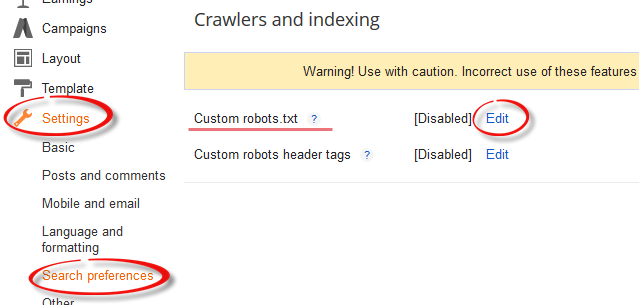
You can easily view your Robots.txt file either on your browser by adding /robots.txt to your blog address like http://myblog.blogspot.com/robots.txt or by simply signing into your blog and choosing Settings > Search engine Preference > Crawlers and indexing and selecting Edit next to Custom robots.txt.

blogger custom robots

How Robots.txt does looks like?

If you haven't touched your robots.txt file yet, it should look something like this:
User-agent: Mediapartners-Google
Disallow:
User-agent: *
Disallow: /search
Allow: /
Sitemap: http://myblog.blogspot.com/feeds/posts/default?orderby=UPDATED
Don't worry if it isn't colored or there isn't any line breaks in code, I colored it and placed line breaks so that you may understand what these words mean.

User-agent:Media partners-Google:
Mediapartners-Google is Google's AdSense robot that would often crawl your site looking for relevant ads to serve on your blog or site. If you disallow this option, they won't be able to see any ads on your specified posts or pages. Similarly, if you are not using Google AdSense ads on your site, simply remove both these lines.

User-agent: *
Those of you with little programming experience must have guessed the symbolic nature of character '*' (wildcard). For others, it specifies that this portion (and the lines beneath) is for all of you incoming spiders, robots, and crawlers.

Disallow: /search
Keyword Disallow, specifies the 'not to' do things for your blog. Add /search next to it, and that means you are guiding robots not to crawl the search pages /search results of your site. Therefore, a page result like http://myblog.blogspot.com/search/label/mylabel will never be crawled and indexed.

Allow: /
Keyword Allow specifies 'to do' things for your blog. Adding '/' means that the robot may crawl your homepage.

Sitemap:
Keyword Sitemap refers to our blogs sitemap; the given code here tells robots to index every new post. By specifying it with a link, we are optimizing it for efficient crawling for incoming guests, through which incoming robots will find path to our entire blog posts links, ensuring none of our posted blog posts will be left out from the SEO perspective.

However by default, the robot will index only 25 posts, so if you want to increase the number of index files, then replace the sitemap link with this one:
Sitemap: http://myblog.blogspot.com/atom.xml?redirect=false&start-index=1&max-results=500
And if you have more than 500 published posts, then you can use these two sitemaps like below:
Sitemap: http://myblog.blogspot.com/atom.xml?redirect=false&start-index=1&max-results=500
Sitemap: http://myblog.blogspot.com/atom.xml?redirect=false&start-index=500&max-results=1000

How to prevent posts/pages from being indexed and crawled?

In case you haven't yet discovered yourself, here is how to stop spiders from crawling and indexing particular pages or posts:

Disallow Particular Post
Disallow: /yyyy/mm/post-url.html
The /yyy/mm part specifies your blog posts publishing year and month and /post-url.html is the page you want them not to crawl. To prevent a post from being indexed/crawled simply copy the URL of your post that you want to exclude from indexing and remove the blog address from the beginning.

Disallow Particular Page

To disallow a particular page, you can use the same method as above. Just copy the page URL and remove your blog address from it, so that it will look something like this:
Disallow: /p/page-url.html

Adding Custom Robots.Txt to Blogger

Now let's see how exactly you can add Custom Robots.txt file in Blogger:

1. Sign in to you blogger account and click on your blog.
2. Go to Settings > Search Preferences  > Crawlers and indexing.

blogger custom robots.txt

3. Select 'Edit' next to Custom robots.txt and check the 'Yes' check box.
4. Paste your code or make changes as per your needs.

custom robots.txt

5. Once you are done, press Save Changes button.
6. And congratulations, you are done!

How to see if changes are being made to Robots.txt?

As explained above, simply type your blog address in the url bar of your browser and add /robots.txt at the end of your url as you can see in this example below:
http://helplogger.blogspot.com/robots.txt
Once you visit the robots.txt file, you will see the code which you are using in your custom robots.txt file. See the below screenshot:

custom robots

Final Words:

Are we through then bloggers? Are you done adding the Custom Robots.txt in Blogger? It was easy, once you knew what those code words meant. If you couldn't get it for the first time, just go again through the tutorial and before long, you will be customizing your friends' robots.txt files.

In any case, from SEO and site ratings it's important to make that tiny bit of changes to your robots.txt file, so don't be a sloth. Learning is fun, as long as its free, isn't it?

Karbonn A27+ Optimized Stock ROM (MTK6577)

              Karbonn A27+ (MTK6577) comes with Stock Android 4.1.2 which has tones of Pre-installed Apps out of which about 90% remain unused, which ultimately creates lag & eats up your battery life in background.  Several OS developers, device manufacturers or mobile service carriers add restrictions in the stock firmware ranging from locking the use of the device with one network/region to disabling sideloading of apps (we’re talking about you, AT&T) not available in the official app market, to advanced restrictions removing any chance of getting root access, just to name a few.Chances are, if you have heard the term “custom ROM,” you have likely also heard the term “Stock ROM.” A stock ROM is the software that ships on your device. It is official, signed software from a phone manufacturer that will either come on the device when you buy it or will come in the form of an update.
Custom ROMs, however, are either altered version of this software or modified versions of Google's stock Android software. Android is an open source project and all of the source code is openly available for anyone to download, tweak, and reproduce. Google indirectly encourages this. If you have already heard of the previous terms, you have also probably heard of CyanogenModMIUI, or some other multi-platform, widely supported and praised development teams. This ROM is for the AOSP lovers.
Checkout : 
Features : 
  1. Removed tones of Bloatwares.
  2. Optimized Ram management.
  3. Fast App switching.
  4. Removed delay in opening recent apps.
  5. Add Performance tweaks.
  6. Ram management tweaks.
  7. Network tweaks.
  8. Pre rooted.
  9. Reduced background battery lose.
  10. No more heating issues after playing games.
  11. And few fixes over stock Android version of A27+
Bugs :
            No, this rom has no bugs as its an improved version of stock rom provided by Karbonn with lots of performance increasing tweaks to offer best output out of your Karbonn A27+

Download Link : 
Installation method : 
  1. How to Root Karbonn A27+ in single click : Root
  2. ClockworkMod Recovery of Karbonn A27+ : CWM.
  3. How to Install CWM : Installing CWM easily.
  4. After installing CWM check this : How to Install custom ROM.
                  I hope you like this ROM and it changes your mind about the capability of Karbonn A27+. Don't forget to Like, +1 & Share this post with all other stock rom users of Karbonn A27+ so that this helps them too. Don't hesitate to ask your questions in comment section. Good day !

KiKat 4.4.1 | Karbonn A5/A7/A7+ | Xperia Z1 UI.


ROM Features : 


PERFECT MOD V2

Xperia Z LockScreen

data2ext + init.d (unlimited internal memory from your card. partition your card for ext2 partition using minitools)

Touchwiz Galaxy S4 Launcher with Xperia Z Icons

Xpodse, Xtheme, GravityBox, Xblats Tool, Greenify, etc,

Integrated Xloud + Bravia system

Rom is very light and smooth with Requirement is only 200MB System


BUGS :
None Yet on Karbonn A7+

Download Link : KitKat for A5/A7/A7+


Credits : XDA , K4D .

Like us on Facebook For Latest ROM updates and firmware. Hit the Like Button if you found this post helpful. Please Share this post.

Nokia X Rom for Karbonn A9+ and Karbonn A21.

             Time has come where we can finally install Nokia X rom on our Karbonn A21 & Karbonn A9+ easily. Today I am going to show you process to install Nokia X rom on Karbonn A21 Smartphone.Nokia X has got some cool interface from Windows packed in an Android OS. Nokia X Rom for Karbonn A9+ and Karbonn A21 Snapdragon based Karbonn Smartphones. I really appreciate the efforts of the developers of this ROM.
   

Features :
  1. Complete Nokia X UI. Extracted from original Nokia X ROM.
  2. Nokia X Launcher
  3. Nokia X Camera App
  4. Nokia X lockscreen.
  5. Nokia X themes.
  6. Customized Nokia X camera for Better performance.
  7. Added Kernel to reduce ram usage and Battery consumption.
  8. And many more things. 

Bugs :  

None.

Download Nokia X ROM For A21/A9+ ROM : Nokia X Rom for A21


Screenshots : 


Warning : "I am not responsible if anything happens to your phone during this process. I can only guide/help you in such situations. "

Samsung Galaxy S4 Custom ROM for Karbonn A27+

             Presenting Samsung Galaxy S4 Custom ROM for Karbonn A27+. Perfectly stable rom, optimized with some build tweaks for less battery usage. Sorry for the camera bug in this rom.  I hope you enjoy this rom. Samsung generally known for its touchwiz launcher has Provided Galaxy S4 with some cool features which are also included in this ROM. Also the gestures of Galaxy S4 are working in few places.                                     

Features: 

  1. Flare LockScreen
  2. Gesture : - Only works on the Home Screen and App Screen and Gallery) :(
  3. Dual Sim
  4. Swipe to Call and Swipe to Message
  5. S4 Launcher
  6. S4 Quick Toggles
  7. S4 Task Manager
  8. S4 Battery Icon
  9. S4 Wallpapers
  10. S4 Framework
  11. S4 Tabbed Settings
  12. S Voice
  13. S4 Wallpapers
  14. S4 Sounds
  15. S4 Ringtones
  16. S4 UI Sounds
  17. S4 Notifications
  18. S4 Alarms
  19. S4 SMS
  20. Samsung Bootanimation
  21. S4 Fonts
  22. S4 Dailer
  23. S4 Framework
  24. S4 Tabbed Settings
  25. S4 Battery Icon
  26. S Voice
  27. X-Reality Engine
  28. Awesome Beats
  29. Fully Deodexed & Zipaligned
  30. Build.prop Tweaks
  31. Init.d Scripts
  32. busybox
  33. Faster Streaming
  34. Net Speed Tweaks
  35. Signal Tweaks
  36. Pre-Rooted  
  37. Free Ram : 150+ Always.
  38. Added Custom kernel for Better battery life and performance.
Bugs:
         No,If you find any bugs then feel free to comment.

Download Link : 

  1. Link 1 : GalaxyS4 Rom for KarbonnA27+ 
  2. Link 2 : Galaxy S4 ROM for Karbonn A27+
Screenshots : 


               For Fixing the Contact Sync Bugs Just copy the Contacts.apk file from Any of the ROM of Karbonn A27+. I hope you like this ROM. If you have any queries regarding the ROM you can use the comment box below to ask your doubts or you can also contact us through the Contact form at the bottom. Keep visiting ! Good day !

Samsung Galaxy Note 3 Custom ROM for Karbonn A27+

           After a long gap i'm back with another ROM for Karbonn A27+. Note 3 Neo the latest phone from Note 3 series has got some really cool features with better interface. So, today i'm here with Galaxy Note III Neo's Custom ROM for Karbonn Titanium S9. It's been a long since any custom ROM for Titanium S9 has been posted. Sorry, for this delay as my exams are going on. Let's get back to the ROM, What is different in this ROM from other Note 3 ROM? Yes, this ROM has got advanced sensors like Smart pause & the best part is it works sometimes in Karbonn A27+. Kitkat based Interface, Smart gestures, heavily optimized with build tweaks & much more. What else you want from a custom ROM? So, Let's move ahead.


Samsung UI and Note 3 Features :
  1. New Note 3 User Interface Auto Insurance
  2. S4 Task Manager Auto Insurance
  3. Samsung Galaxy Icons Auto Insurance
  4. Galaxy Fonts Auto Insurance
  5. S Voice
  6. Galaxy Notes Auto Insurance
  7. S Music
  8. S Sound Recorder
  9. Vibrate On Call Connect
  10. Samsung In-Call Screen and Dialer
  11. Some Note 3 & S4 Apps
  12. Samsung Bootanimation
  13. Galaxy Note 3 + S4 Ringtones
  14. Samsung Galaxy Wallpapers
  15. Samsung Dailer
  16. Build.prop Tweaks
  17. Fluid And Even More Smoother
  18. Pre-Rooted
  19. Faster Streaming
  20. Net Speed Tweaks
  21. Signal Tweaks
  22. Better Responsiveness & Speed
  23. Proximity Tweaks Auto Insurance
  24. Battery Saving Tweaks Auto Insurance
  25. Smooth & Improved Touch Auto Insurance
  26. Samsung New Status Bar Auto Insurance
  27. Amazing Battery Backup Auto Insurance
  28. Super Smooth Performance Auto Insurance
  29. Some SD Speed Tweaks Auto Insurance
  30. Vividness Patch PreIncluded Auto Insurance
  31. S Calender Auto Insurance
  32. No Delay In Making Call Auto Insurance
  33. Fast GPS Auto Insurance
  34. Fully Samsung themed System UI & Framework Auto Insurance
  35. Samsung Incoming Call + Outgoing Call Screen & Contact Photo
  36. Fully Samsung Modded Contacts & Messaging Auto Insurance
  37. Air Gesture Perfectly Working. Auto Insur
Unmatched Features. :
  1. Performance at its best
  2. Optimized to reduce load on system
  3. Low on power consumption (battery)
  4. Made with great precision
  5. Removed all issues
  6. Finally, you will love it...
  7. Added Default Music Player as Walkman of XperiaZ2.

What is Different ? 
  1. Sun Reflect Effect on lockscreen.
  2. Notification Bar with sliding toggles.
  3. Best Undistorted Settings.
  4. Modded Notification.
  5. Theme from Samsung
  6. Multi DPI everything, now select preferred DPI.
  7. Great looks.
Connectivity :

  1. Optimized with build.prop tweaks
  2. Internet and wifi Speed optimized.
  3. In kernel collaboration WIFI strength improved
  4. Signal strength improved.

Bugs :  System UI Force Closes While connecting USB Storage.

Screenshots :


                Please read the bug section before installing this rom. Better take a nandroid backup of your phone. I hope you like this ROM we will try to fix the bug as soon as possible. Keep Visitng ! Have a Good day !

PLACE YOUR ADS HERE